 Tiny Desk Video
Outstanding Tiny Desk AI Template: 1 to 4 Photos, 10 Seconds
Use the Outstanding Tiny Desk AI template with 1 to 4 photos — a 10-second clip with the music already in it. No CapCut, no editing timeline.
Last updated: 2026-10-27
The Outstanding Tiny Desk AI template turns your photos into an All-Loss-style clip: your own cast behind a concert desk, performing to a 10-second excerpt of “Outstanding.” Upload 1 to 4 photos and get a vertical video with the music already in it. No CapCut, editing timeline, or manual audio sync.
The format draws on Charlie Wilson’s 2023 NPR Tiny Desk performance. For the backstory of the coaches edit, read what the Outstanding Tiny Desk meme is and where it came from.
Real generation example
Four photos. One performance.
These four portraits produced the 10-second clip beside them. Play it with sound to see the cast in action.
Input photos

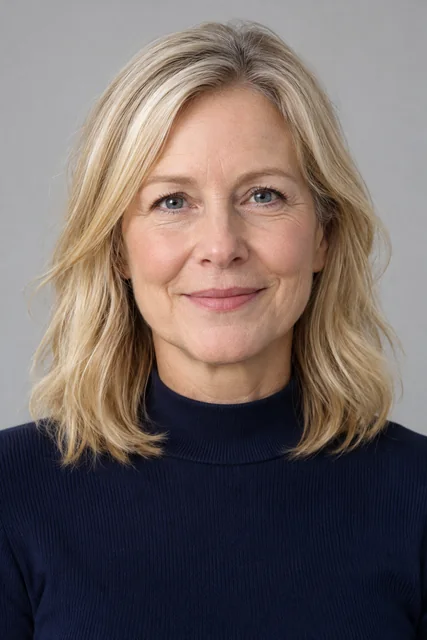
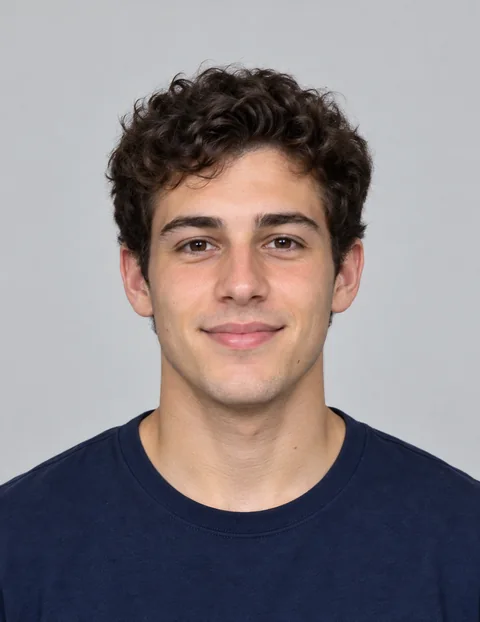
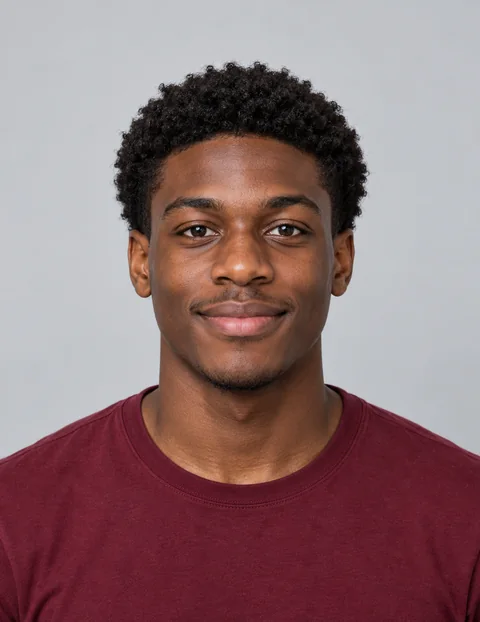
AI-generated example · four-person version
Finished video · 10 seconds
What you actually get
- A finished 10-second clip, 9:16 vertical MP4, ready to download.
- Music already included — no separate track to find or align.
- One to four people. Upload one photo per consenting adult; unused positions become fictional AI performers.
- One-time payment, no subscription. Packs give you one or more separate video generations.
- No watermark. Download the finished video from My videos.
One photo or four: how the group version works
One person. Upload one clear, front-facing photo. That person takes the lead position; the other positions are filled with fictional AI performers.
Two to four people. Upload one photo per person. Put the lead in the first slot and assign the others to the remaining band positions. The four-person example above shows the full cast.
Getting a result people recognize
The photo you start with has a large effect on the result.
- Face the camera. A straight-on portrait gives the generator a complete face to work with.
- Light the face. Daylight or an evenly lit room is better than a dim photo.
- Show a clear expression. Avoid sunglasses, heavy filters, and a face cropped at the chin.
- Keep the group consistent. Photos taken from similar angles make the cast look more cohesive.
Once you have chosen the photos, you are ready to generate.
Why this format uses ten seconds
This format is built around a short stretch of the “Outstanding” performance. Each generation makes one 10-second clip with the song excerpt already included, so you can review and download it without trimming a longer recording. A larger pack buys more separate generations, not a longer video.
Do you need a CapCut template for this?
CapCut templates can work for this trend, but they ask you to place photos and check the edit yourself. Here you upload photos in the browser, generate a finished MP4, and download it from My videos. There is no editing timeline to manage.
How to make it
Make yours — 1 to 4 photos, 10 seconds
- Pick your photos. Use one clear photo per consenting adult, up to four people.
- Choose the Outstanding Tiny Desk style. Assign each photo to a band position and watch the reference sample.
- Generate. Choose a one-time pack, start the task, and follow its status in My videos.
- Download and post. Review the 9:16 MP4 and its sound before uploading it to your chosen platform.
For file formats, photo checks, and troubleshooting, see how to make a Tiny Desk AI video from your photos.
How to post it
Label the result as AI-generated, preview the final post, and follow any audio notice shown by the platform. Use photos you have permission to share; the Terms explain who can appear.
FAQ
How many people can I put in one video?
One to four consenting adults. Upload one photo per person. Empty positions are filled with fictional AI performers.
What exactly do I get?
A finished 9:16 vertical MP4, 10 seconds long, with an “Outstanding” song excerpt included. Download it from My videos after reviewing the result.
How long is the finished clip?
Ten seconds. Each pack gives you a number of separate generations, not a longer clip.
Do I need CapCut or another editing app?
No. Upload your photos in the browser and download the finished clip when generation is complete.
Can I change the song?
No. The clip includes an “Outstanding” excerpt; uploading another song is not currently supported.
Whose photos can I use?
Use photos of adults who have agreed to appear and that you have the right to upload. Public figures, including coaches and athletes, are not accepted.
What does it cost?
One-time packs start at $7.99 for one video. Other pack sizes and current prices are shown before checkout. There is no subscription or automatic renewal.
Tiny Desk Video is an independent fan tool for AI parody videos. It is not affiliated with, endorsed by, or connected to NPR, NPR Music’s Tiny Desk Concerts, Charlie Wilson, The Gap Band, or any team, school, league, or athletic program. “Tiny Desk” is a trademark of NPR. The example clip on this page is AI-generated and is not a real concert recording.